![Allocator_Logo_Colour_Mark.png]](https://www.allocator.com/hs-fs/hubfs/Branding%20-%20Images%20and%20Logos/Allocator%20logos/Allocator_Logo_Colour_Mark.png?height=40&name=Allocator_Logo_Colour_Mark.png)
Formula
=ALLOCATOR_ATTRIBUTION_ARRAY( [Text] ID, [Text] Categorization, [Text] Table, [Text] Variable, [Text] Category, [Text] Mode, [Date] Start Date, [Date] End Date, [Text] Include Funds, [Text] Level, [Text] Trim)
Arguments
ID - Required - Text - Eg: fdedb7 The Fund, Company, Series, Portfolio ID.
Categorization - Hypothetical - Text How you want the data to be fetched.
Table - Required - Text - Eg: Long & Short The table to load.
Variable - Hypothetical - Text - Eg: Short The type of data you want.
Category - Hypothetical – Text Path to the category you want the value of.
Mode - Required - Text - Eg: Wide How you want the output ("Wide" or "Narrow").
Start Date - Optional - Date The start date in YYYY-MM-DD format.
End Date - Optional - Date The end date in YYYY-MM-DD format.
Include Funds - Optional - Text Include funds or not.
Level- Hypothetical - Text The level of depth of Attribution.
Trim- Optional - Text Trim leading and trailing months if no categories other than unexplained are populated.
Example
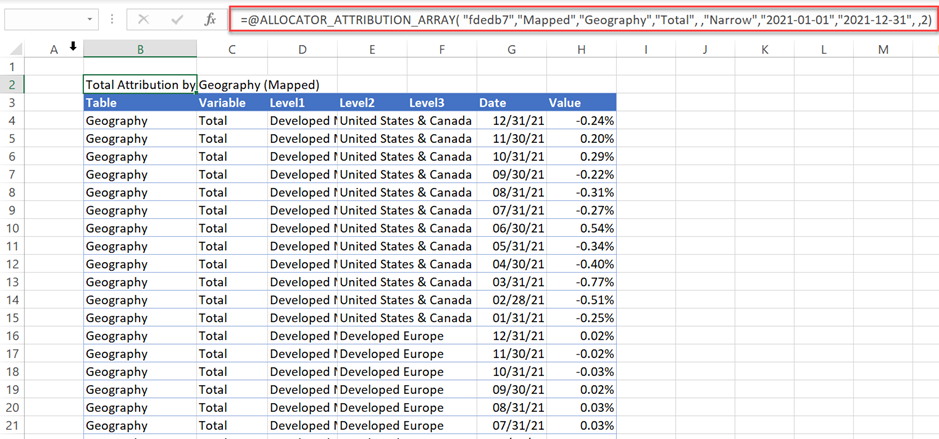
The Geographic Attribution values for fund “fdedb7” for the year 2021.
= ALLOCATOR_ATTRIBUTION_ARRAY( "fdedb7","Mapped","Geography","Total", ,"Narrow","2021-01-01","2021-12-31", ,2)
Remarks
 [Category] This is Required as long as there are categories available.
 The date field is not format sensitive if you input a cell reference.
If the dates are ignored, Attribution Array will return everything without any date restriction.
 [Categorization] If ID is a Portfolio then Categorization is Ignored and = Mapped.
 [Category] In case there is no category available, Category is Ignored and = Variable.
 [End Date] This argument is Ignored if Mode = Narrow.