![Allocator_Logo_Colour_Mark.png]](https://www.allocator.com/hs-fs/hubfs/Branding%20-%20Images%20and%20Logos/Allocator%20logos/Allocator_Logo_Colour_Mark.png?height=40&name=Allocator_Logo_Colour_Mark.png)
Formula
=ALLOCATOR_RETURNS_ARRAY( [Text] ID, [Date] Start Date, [Date] End Date, [Text] Time Unit, [Text] Show Estimate, [Text] Show Derived From)
Arguments
ID - Required - Text - Eg: fdedb7 The Fund, Company, Series, Portfolio ID.
Start Date - Optional - Date - Eg: 2021-01-01 The start date in YYYY-MM-DD format.
End Date - Optional - Date - Eg: 2021-12-31 The end date in YYYY-MM-DD format.
Time Unit - Optional - Text - Default: Monthly The periodicity of the returns.
Show Estimate - Optional - Text - Default: No Whether to show the return if it is an Estimate.
Show Derived From - Optional - Text - Default: Yes Whether to show the Derived From column.
Example
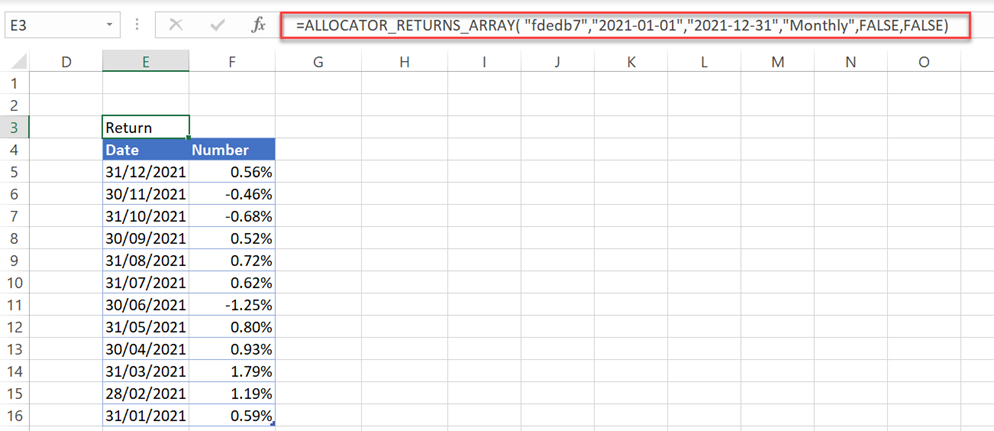
Returns of Fund "fdedb7" within 2021.
=ALLOCATOR_RETURNS_ARRAY( "fdedb7","2021-01-01","2021-12-31","Monthly",FALSE,FALSE)
Remarks
 If the dates are ignored, Returns Array will return everything without any date restriction.
 The date field is not format sensitive if you input a cell reference.
 [ID] If a Fund ID is given, the Default series will be used.
 [Start Date] If you don't specify the start date, Returns Array will return everything before the end date.
 [End Date] If you don't specify the end date, Returns Array will return everything after the start date.